
Widget Component Drawbacks
- Nov 23, 2022
- 5 min read
Widget Components seem nice at first glance. A neat component that creates and keeps a widget at the screen space of it's component. It works well given all things considered. Having said that there are some huge glaring issues with Widget Components. We'll start with performance and then get into design drawbacks.
Performance issues with Widget Components.
Widget components are a Scene Component. This means that they require a transform and that whenever their actor moves, they move.
This costs relatively little, until you start ending up with hundreds of these moving all of the time. This is just the scene component overhead. On top of this these widgets are also moved and updated even if they are off screen.
I can't stress that last part enough. Widget components still move and update their widgets screen space transform even when they're off screen. If that wasn't enough they also Prepass, meaning that their layouts are recalculated every frame. This all adds up and gets extremely costly really fast.
For very small games, or very simple setups these drawbacks can be perfectly acceptable. In Red Solstice 2, we have potentially huge maps and a lot of things in the levels can have a widget component. Thankfully only about 2% of our widget components actually move and incur the scene component cost. But anywhere from 400 to 1200 widget components existing without movement was still a problem. These were greatly simplified into minimalist designs and still had problems. We had a minimum cost of 0.5ms on nothing but Slate Prepass for widgets that weren't even on screen. That number went up closer to 1.3ms in larger maps.
So how do we cut back on the performance costs of Widget Components? Two ways.
•One is to use them in places where the actor they are a part of does not move. This can also include putting it on a root of an actor even if another component moves. This will save you a minor amount of frame time.
•Two is to hide the widget component or collapse it's internal widget. Setting the Component's visibility to hidden will also collapse the internal widget. This stops any ticks on the widget and will also take it out of consideration for Prepass. I use a subsystem that a WidgetComponent subclass registers to. This subsystem ticks and checks the widget's potential screen space. If it's not able to be shown, it'll hide the component. This tick function costs about 0.27ms in our larger maps, but it also cuts Prepass time by over a millisecond. Meaning a net change of 0.8ms on said map. A significant change when you consider that is on a 5900x. A slower CPU could be looking at almost 2ms frame time change which is incredible when your minimum budget is usually 16.66ms frame time.
Having thrown all of these concerns out I would like to reiterate that this is a special case where we use a lot of these components. A game with a few dozen or maybe a hundred components in a level will see no real problems.
Design Drawbacks
From an ease of use standpoint, WidgetComponents are great if you're not used to screen space math. You throw them on an actor and then specify the widget and that widget pops up and follows the actor around.
This is where the first design flaw comes in. Chances are that the widget related to the actor requires some form of notification or info from the actor to function. Lets use the simple example of a name widget over an actor. We're going to be lazy and tick this name property to keep this short because this isn't about how we set the name as much as how the widget acquires what it needs to show the name.
Current default implementation:
Here I have nothing but a simple Character class with a widget component in it. It's using Beginplay to set context in the widget.
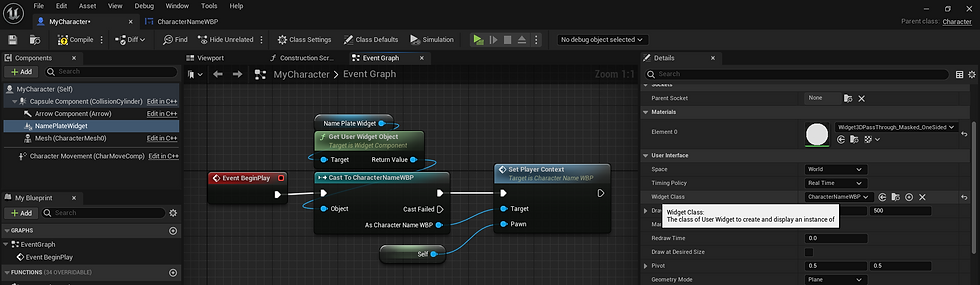

This breaks my first UI rule. Gameplay classes should never care about UI. Right now this character has to care about the UI, it has to pass information to the widget. This is also holding a hard pointer to the widget, which means if I open this Blueprint in editor the widget is loaded to and I don't care about the widget at this point. What if the widget needs to look up a bunch of datatables or a data asset the character never needs to care about? That is what this following Sizemap is going to show. The widgets 22.1 size can grow super fast once images and other data becomes involved and it can very quickly. The character class doesn't need to care about this stuff.

The conclusion is simply that the current implementation of WidgetComponent is fine, but definitely not scalable and not immediately easy to use. In fact it's a super common question in Unreal Slacker's discord of how to pass info to a WidgetComponent's Widget. So what if you didn't need to do that?
What can we do differently?
So we want a simpler, scalable implementation. Unfortunately for BP users this requires a little bit of C++. Thankfully it's a couple of super simple lines and two subclasses.
I made this a while ago out of curiosity. I've never gotten around to making it Async, but we'll use it for demonstrative purposes.
First, lets look at how this new implementation looks from a designer's standpoint. For starts, no BeginPlay Code. You drop the component on the actor, and specify the widget class. and pull the owning WidgetComponent in the Widget itself.


All of the code is now solely in the widget. And the best part? The widget class in the component is a soft pointer. And that means that my Character's Sizemap doesn't care one single bit about that widget. This is my new Character Sizemap.

So now for the how. I'm going to post a bit of code here and then go through it.
Component Header

Component body.

Widget Header
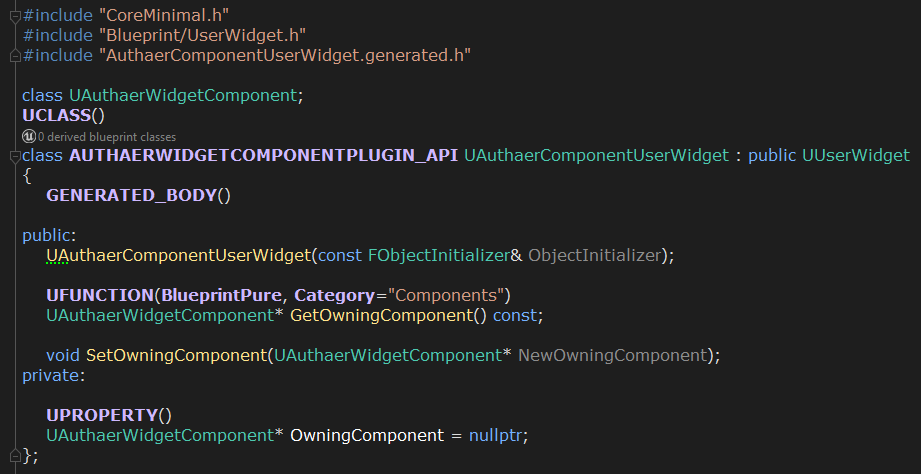
Widget Body

For those accustomed to C++, you can already see what's going on. In the Component, we're overriding InitWidget. This is where the component creates it's UserWidget. I've overridden this and set the normal WidgetClass pointer from my SoftPointer, then called super to make native code create the widget. And them I'm getting that widget and setting it's OwningComponent as 'this', meaning the WidgetComponent. This OwningComponent is valid by the time PreConstruct or Construct are called. It is not valid at Init I don't believe.
The Widget class has a simple GetOwningComponent that can reference the component directly. With access to the Component, it has access to the actor that owns the component. Meaning that the widget itself can pull all the data it needs. In our use case this was just the player state from the pawn to get the name.
In more complex cases you can get a lot more info from your actor. It's equipment, weapons, current status effects etc. And all the while the actor this widget belongs to never has to know it exists. This can quickly spiral into a case of good design. For instance if you alter the UserWidget to automatically collapse it's widget tree when it's actor is off screen for instance. You can do this all in the UI with access through the component.
Conclusions
Widget components are great. But the default implementation is just short of the finish line. They can easily scale out of control and be detrimental to performance. Native implementation requires gameplay to know about UI, which isn't good.
They offer simple designer friendly ways to handle UI related to actors in game. And with a couple of super simple minor changes and considerations they can really shine even in huge scalable solutions.
If you are, or have a programmer on your team, I strongly recommend these changes outlined above, specially with an async solution (which I'll update here when I get around to it). Coupled with a subsystem that can manage the ones off screen, they can scale easily into the thousands with very little performance cost.

Comments