
Casting Performance Concerns in Unreal
- Feb 5, 2022
- 13 min read
As a fair warning here, this is largely blueprint based! These topics still apply very much to C++ users, who should be aware of how to apply these in C++ anyhow.
This is also a fairly long post that will also go into using soft class references
Casting is NOT a bad thing
Lets start with the issue. You're likely here because you want to understand why people say to use interfaces and avoid casting as much as possible. I would like to say that anyone who has said this has zero understanding of how Unreal's garbage collection and class default instantiation works and is simply repeating things they have seen or heard online.
Casting is not a terrible thing, it will not make your project spiral out of control if you just have a basic understanding of what you are doing.
Requirements
To follow along with this, you will need a basic understanding of what pointers are, how casting works, and generally how class hierarchy works.
Feel free to check out some of my other posts on these topics!
Performance
This area is about the runtime performance of casting. I wanted to cover this to get this out of the way. People are under the impression that casting is somehow a severe problem for runtime performance. I'd like for people to understand that this is not even remotely an issue for casting and is not the real problem.
The test
So we're going to put together a little test. We're going to create a basic test that displays the runtime performances of casting. Of course this isn't going to be a robust test, but it will help you understand that it's not as severe as people think.
Lets start with a couple of classes. I'm going to use a PlayerController for input, and I've made a simple Actor class with a float in it that I've dropped of of into the level. I'm saving this reference at Beginplay, so the runtime performance of getting this actor in our test is zero. I'm using a simple Stat Raw command to display the performance graph. I have a practically empty level.
Our goal is to measure the performance it takes to obtain and set a float from this actor multiple times. the float value will not change as that is not the purpose of this test. Our only variable should be the different ways we access the float from the other Actor.
Here I have set two pointers. One is of the type that has the float. The other is a simple AActor pointer.

This is my graph doing nothing.

Test1
Lets make our first test. We do nothing but simple access the value directly off of the already cast pointer.

This is the output of this test. It takes a little over 92ms to process this 50001 times. That is four button presses

Test2
Lets make a second test. This time we will use our Actor pointer and pure cast it to our testing actor type, then access the same float.
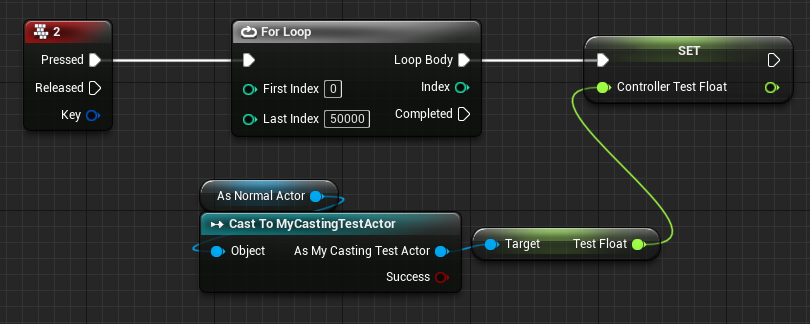
Here is the output of the second test. Same loop count, and yet only 3ms more at 95 ms.
That's about a 3% difference.

Performance Conclusion
This test shows a 3% difference in casting versus non casting performance time in runtime code. Most of this is due to the function overhead from the casting node and not so much the cast itself. If done in C++, I would expect no performance difference here.
3% can be a lot. But lets be clear here that we're talking abou 50,001 iterations in a single frame. Lets face it, if you're iterating this much in a frame, you have other performance issues to deal with and casting is going to be the last thing on your list!
So now that we've pointed out that runtime casting is pretty much the same as using a regular pointer, lets talk about the real issue.
The real problems with casting
So the real problem with casting is objects being loaded into memory. We're going to go over this in some detail. You've likely heard stories about people avoiding casting because of horror stories about people ending up with a project where every level took six gigs of memory despite that they were only using 300mb worth of assets in each level.
These are valid fears. And they have driven people so far as to abuse and misuse interfaces to avoid this fate. This is because interfaces inherently "cast" to the interface and not other classes, so it creates a safe zone where the interface is always loaded and not the stuff it calls methods on. It also create bad coding disconnects, and adds a LOT more work to doing basic things. It promotes a programming style where you repeat yourself a lot and is just generally a terrible idea.
Lets make a simple example. You have a simple interface named InteractionInterface. You use this everywhere. You use it on apples, you use it to mount a horse, to open a door. You use it to open a widget on screen when an AI does something, you use it when a projectile hits an object. It's being called from tons of objects on tons of objects. Now suddenly you have a widget showing up on screen when it shouldn't... and you have to track down why. Well good luck with that, because when you go searching for this interface function, you're going to find dozens to hundreds of calls. You are not going to have a clear image of what is calling this because there is no way to know if it was the AI, the projectiles, some other widget, the player controller, the player's pawn, the GameState. You have zero idea what did this and no way to backtrace it. You're also working on a game for three years and there are thousands of classes in your codebase. Basically? You're screwed, because you're going to spend the next week sifting through half of your code base to find what called what that leads to this widget popping up.
For this reason, I would strongly advise to avoid avoiding casting. Please use casting and correct hierarchies as well as soft pointers. Interfaces will not solve all of your memory referencing issues and can make you blind to them. There are several cases where even without a single cast in your ENTIRE project, you can have assets that are massive in memory.
Separation of Assets and Gameplay Classes
Lets begin by separating two things. There are Assets, and then there are Gameplay Classes.
An asset is a class or object that generally holds data, whether for code or visually. They don't usually have much coding and the little they might have usually relates to handling themselves or the data they hold. There are two types of "Asset" classes usually. One is a static type. These are things like Static Meshes, Skeletal Meshes, Materials, Textures, Particles, DataAssets, and Datatables. Another type of Asset Class is something like a Character class child that doesn't actually have much programming in it, but has a lot of it's StaticMeshComponents's StaticMesh property specified, or SkeletalMeshComponent's SkeletalMesh property specified. These can be treated as Asset classes because they have heavy assets specified by default. We'll get into why this matters later.
A Gameplay Class is a class that is usually extremely light on memory. It is often just code. Even the default ACharacter class is a Gameplay class in this sense because it has no SkeletalMesh specified in it's Mesh component. Thus it has no assets specified and thus having it in memory is extremely lightweight. These classes often have your code. Managers that handle complex tasks, the base class for your Characters, GameMode, GameStates, PlayerController, or PlayerState. These have no textures, or materials, or particles, etc. So having them in memory is cheap.
CDO or Class Default Object
Unreal's core systems will create a CDO of an object in memory. This is the actual thing copied when you do things like SpawnActor, CreateWidget, NewObject, etc. You're basically copying this CDO's state into a new instance. In reality this is extremely quick compared to say.. looking up this class on disk and creating a new instance of it that way. Imagine having to do that every time you spawn a bullet projectile!
This is important to know, because when Unreal instantiates a Class's CDO, it looks up every hard pointer on that class and makes sure that those Class's CDOs are already loaded as well.
Lets do an example really quick with some terrible code.
You have a character. This character has the code to consume an Apple. The Apple has code that can make a Horse play an event.
You create a new level. Totally empty except for your Character. No horse in sight. Nothing that can spawn a horse, no apples either. Just the character there. But if you check your memory, you'll see the CDOs of the Horse and the Apple.. but why? Nothing is going to spawn them they don't exist in this level! Along with these classes being loaded, the static meshes for the Horse and Apple are loaded. Horse's anim blueprint, the dust particles it spawns when running over dirt, the sounds it makes, etc.
All of these unused, heavy assets just because the character exists and because your Character has a hard pointer to Apple, and Apple has a hard pointer to the Horse.
Now. This is bad gameplay coding. In reality you would have a base class named something like Consumable with some code and events in it for Apple. And you'd probably have a Pawn base class for the Horse that has events in it that Apple could call.
Then what would get loaded when the character is loaded are those tiny base classes Consumable and BasePawn. No more horsey or apple nomming sounds, no more dust particles, no more apple and horse meshes. Just two tiny little classes.
As a side note. A hard pointer can be either to an instance or the class. In blueprint these are the usual sky blue pointers or purple pointers you're used to seeing everywhere.
Separating Instantiation from gameplay code
So we know that we can keep Apple and Horse from being loaded into memory from levels where they don't need to. But what if we wanted to make spawners for them, but not always have them loaded unless they're in use?
For example, maybe we want a vehicle spawner. This thing can spawn up different vehicles that all do massively different things. Spawns up boats, horses, airplanes, cars, motorbikes etc. Sure, we know that the spawner can just reference stuff via a baseclass like VehicleBase. This can have child classes like BoatBase, HorseBase, AirPlaneBase, etc. And the spawner's code can just use Vehicle base, and call inherited functions through that, right?
But that leaves us with the disconnect of how we manage to spawn these things in without actually referencing them. This is where SoftClass and SoftObject ptrs come in. But lets talk about garbage collection first.
Garbage Collection
In Unreal, any class or asset that has nothing pointing to an instance or a class will be garbage collected. So lets say you have a Character named Knight. Knight is spawned via softclass(we'll talk about that soon), so it doesn't get loaded until it needs to be. Once it's CDO is loaded, it is spawned. Spawned actors are saved as hard pointer of the Actor type in the current World. So even though we save no hard pointers to it's type, or class, it's CDO stays loaded until Destroy is called on it. Now absolutely nothing is pointing at a Knight instance or a Knight Class. So garbage collection will come along and remove it.
There are three types of pointers. Hard, Weak, and Soft.
Hard pointers point to memory locations and allow access to an instance's properties and functions. They require the class of it's type to have it's CDO loaded if the class that the hard pointer is in is loaded. Hard pointers will stop an instance from being garbage collected as well. For example a UObject of any type created will be garbage collected if not stored in a hard pointer. This includes simple UObject classes, Widgets, Actors, Actor Components, etc. Actors are by default exempt from this because their UWorld manages this by storing them in an actor array for the world. Actor Components are not collected by default because Actors themselves keep these alive.
Weak pointers are used just like hard pointers at runtime in that they point to a memory location and allow you to access an instance's properties and functions, but these WILL NOT stop garbage collection. If you create a UObject and store it in a weak pointer and no hard pointer, it will get garbage collected.
Soft pointers Soft pointers are basically a struct that boils down to two things. The first is a path on disk. The second is a weak pointer. This is important because this means that this property can find the location where an object is on disk and load it into that weak pointer. This is true for asset classes like textures or meshes, or for UObject classes like ActorComponents, or Actors, or Widgets.
Soft Pointers use
So knowing about them is fine, but seeing them used is much more useful. Lets do a small example of our spawner. Lets say we want our designers to be able to create whole actors out of their things. This allows easy fast access for designers to add specialized effects to actors without programmers having to do anything else.
Lets take two planes for example. Lets say we have two jet planes. X241 and MadCat13.
These are both new whole actor classes inheritting from something like PlaneBaseBP. The would come with a few defaults like a StaticMeshComponent, movement component, and maybe some programmer necessary stuff that is needed to access in C++ from a C++ parent class of PlaneBaseBP.
The point is that this is an empty, invisible actor that can fly through the air with it's movement component. Your designer wants to add two different meshes, wants to put condensation particle streams at different locations, wants to use different turbine effects. The cockpit opens very differently on each. Several decals. etc. The point is that functionally these two do the same thing, they fly through the air. But designer wise, the may as well be red and blue, completely different.
So to avoid having to specify all of these things on a base class, waste resources, and teach designers how to use these things that come from the base class, as programmers we just give them an empty shell and let them build it up, all we care about after that point is spawning it.
So how do we spawn an X241 from an Airplane Spawner without having to have the X241 in memory all of the time? Lets start with a few base classes. We're not going to go super indepth here as the point is to demonstrate memory use and soft class loading, not create actual airplanes! Lets create an Airplane Spanwer, AirplaneBaseBP, X241, and the MadCat13. X241 and Madcat13 should inherit from AirplaneBaseBP. AirplaneBaseBP should inherit from Pawn.
Your AirplaneBaseBP should have at least a StaticMeshComponent for this demonstration. We don't really need the movement component, but I'm going to add a floating movement component anyhow.
This is my AirplaneBaseBP. Note that there are no specified meshes, only the components exist.

I have went into the X241 and Madcat13 and set their inherited StaticMesh component's to two different meshes. X241 is a chair, MadCat13 is a couch.


We have our asset classes set up with some assets in them now. This means we don't want to hard reference X241 or MadCat13 anymore. We want to avoid having hard pointers of those types whether they are properties on our other classes or casts.
Lets stop for just a moment and take a look at the size of our empty Airplane Spawner in memory.
Right click on it and open up the SizeMap. Change SizeToDisplay to Memory.


You should see something similar as above. As the spawner references nothing.
So lets start our testing! Lets spawn an X241 the normal way. We're just going to go to Beginplay in the spawner, plop in a SpawnActor node, and specify the X241. Just split the transform struct right now, we don't care where it spawns.

I'd like you to compile, save and check the spawner's SizeMap again. You'll be surprised to notice it has drastically increased from our 3.9ish kb size to 11.5mb. Your sizes will vary depending on what meshes you've used. Note that this 11.5mb is rather small. Simple characters can immediately reach over a few hundred megabytes with skeletal meshes, particles, sounds, etc. I'd also like you to take just a moment and realize that there is no casting going on here. Thus no interface would solve this problem. This would be the same if you created an array of classes and put the X241 class in it, even without the spawn node. Because the purple pin is a hard pointer to a class, meaning that class needs to be loaded from disk before the spawner.

So how do we solve this problem? We ditch any hard pointers pointing directly at the X241. Lets make a new test. We don't need to get crazy with Async stuff, we'll just load the asset from disk and block the game thread for now.

This code will accomplish an identical task of spawning the X241 actor. But check your SizeMap! It has barely moved. Mine here is up to 11kb. A very far distance from 11.5mb

So lets go over what is happening in the previous spawning image in detail. We have beginplay, it runs. That calls LoadAssetClassBlocking. What happens here is we specify the soft class as the X241. This node basically blocks the game thread until it can finish loading the X241 class from disk to memory which creates the X241's CDO. Once this is finished we can move to the next node with the ReturnValue output. Note that the ReturnValue is a UObject class. So we need to cast it to ActorClass. Well our ActorClass CDO already exists here because the spawner itself is an actor, so no extra memory use there. Now we're passing in the X241's actual class casted to ActorClass into the Spawn actor. This means an X241 will be spawned even though the class type is only of Actor. Class pointers work the same as object ones where even though this is of type Actor, it can be used to pass anything that inherits from Actor, not just Actor itself.
Lets go crazier, lets make the spawner randomly spawn an X241 OR a MadCat13. Create a new Property in the Spawner. Go to it's details, change it to a Object but choose SoftClass instead of normal Obbject Reference.

Change that to Array instead of single, and then add two entries, one for each plane. You should end up relatively with the following.

You can hook this array up in either of the following manners, depending on your UE4 version.

I now have the following, for example!

Lets check out memory size now. (Note, I removed a couple of bool properties that I created for grabbing screenshots, it shrunk from 11 to 9.5)

This means that we can drop this spawner on a level, any level. And there is no need for the X241 class or the MadCat13 class to be loaded into memory until the moment they are required for spawning. This means that we can have a spawner that could spawn hundreds, thousands of different plane classes, and never take much more space than this, certainly less than the 11.5mb we saw with the hard reference spawning.
Also as you can see, selecting, and using soft references is nearly as easy as using hard ones. Using this Async requires a little bit of extra work. But it's not difficult. It's mostly setting up a list that can be populated, checking if the class is loaded already and if not then spawning everything of that type from the list once it's loaded from disk and the async callback runs.
Now you have a lightweight base class, AirplaneBaseBP, where you could put all of your programmer code. Cast to this everywhere you want and not care because it's so small. And your designers(or you!) can go crazy with materials and particles, and sounds in these asset classes!
Thank you for reading!
I encourage you to play with this! Understand that this is for large projects where it's a pain to have all of the assets loaded into memory all of the time. You can release your games on much smaller platforms when there are not so many memory restrictions to consider. Doing this also helps your development as having classes that hard reference everything will slow down your ability to test in Standalone.
I hope this long winded post has encouraged you to not avoid casting, but rather to use it correctly. If you are interested on how to use other Soft Object types, I will have more posts detailing more indepth the differences between Class and Object soft pointers, as well as some decent examples of how you might use Soft Object references, as we've shown here how to use SoftClass ones!

Comments